Translate live speech into 12+ languages on Windows. Pixelion Live captures any audio source and shows real-time translation alongside the original transcript.
Language barriers cost time. Whether you are watching a foreign-language livestream, sitting in a multilingual meeting, or reviewing interview footage in a language you do not speak, waiting for a translation adds hours to every workflow.
Pixelion Live is a Windows desktop app that solves this with real-time translation. It captures audio from any source on your PC, transcribes it, and translates it into your target language as the words are spoken. No browser tabs, no copy-pasting into a translation tool, no waiting for post-production.
What Pixelion Live Does
Pixelion Live is a real-time transcription and translation app for Windows 10 and 11. It sits on your desktop and captures audio from three sources:
- System audio — anything playing through your speakers or headphones
- Microphone — your own voice or a room mic
- Both — system + mic combined
The audio streams to OpenAI's Realtime API, which returns transcription and translation simultaneously. You see results appear word by word as they are spoken.
How Live Translation Works
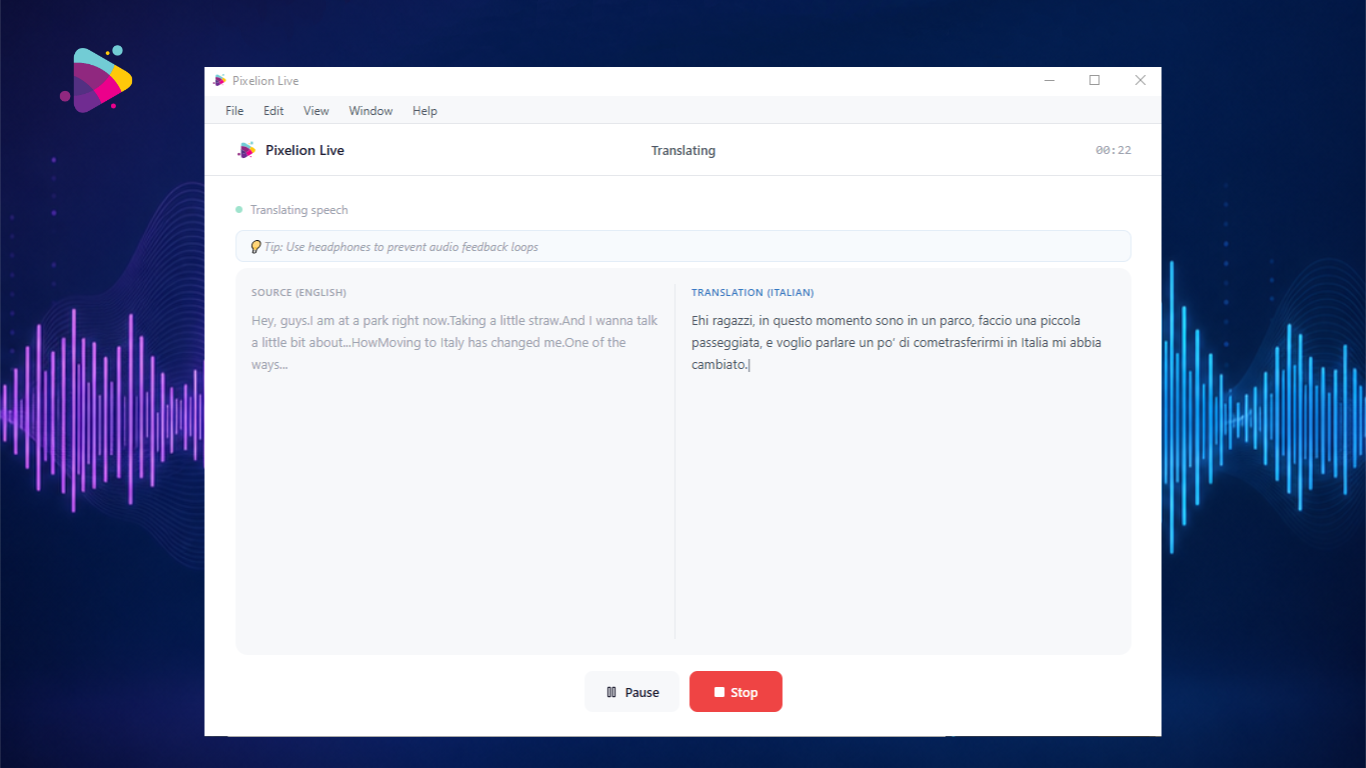
When you select Live Translation mode in Pixelion Live, you choose a source language and a target language. The app then displays a dual-pane view:
- Left pane: The original transcript in the source language
- Right pane: The translated text in your target language
Both update in real time. There is no delay between hearing the audio and seeing the translation.

Supported Languages
Pixelion Live supports translation between 12 languages:
- English
- Spanish
- French
- German
- Italian
- Portuguese
- Japanese
- Korean
- Chinese
- Arabic
- Russian
- Hebrew
You can also set the source language to Auto-detect, letting the AI identify what is being spoken.
Use Cases
Multilingual Meetings and Video Calls
Join a Zoom, Teams, or Google Meet call where participants speak a different language. Set the audio source to "System + Mic" and Pixelion Live translates everything in real time. You get a complete transcript in both languages when the meeting ends.
Watching Foreign-Language Content
Playing a YouTube video, webinar, or livestream in another language? Set the audio source to "System Only" and pick your target language. The translation appears as the video plays. No subtitles needed.
Reviewing Interview Footage
Content creators who interview guests in other languages can import the recording or play it back through Pixelion Live. Get the full transcript in the original language and a parallel translation without sending files to a third-party service.
International Podcast Guests
Podcasters collaborating with guests who speak a different language can use Pixelion Live as a real-time interpreter. Both sides of the conversation are captured, transcribed, and translated.
Live Events and Conferences
Attending a virtual conference with speakers in multiple languages? Pixelion Live captures the system audio and provides live subtitles in your language of choice.
How to Set Up Live Translation
- Download Pixelion Live from the Microsoft Store or pixelion.ai
- Sign in with your Pixelion account (Google, Facebook, Microsoft, or email)
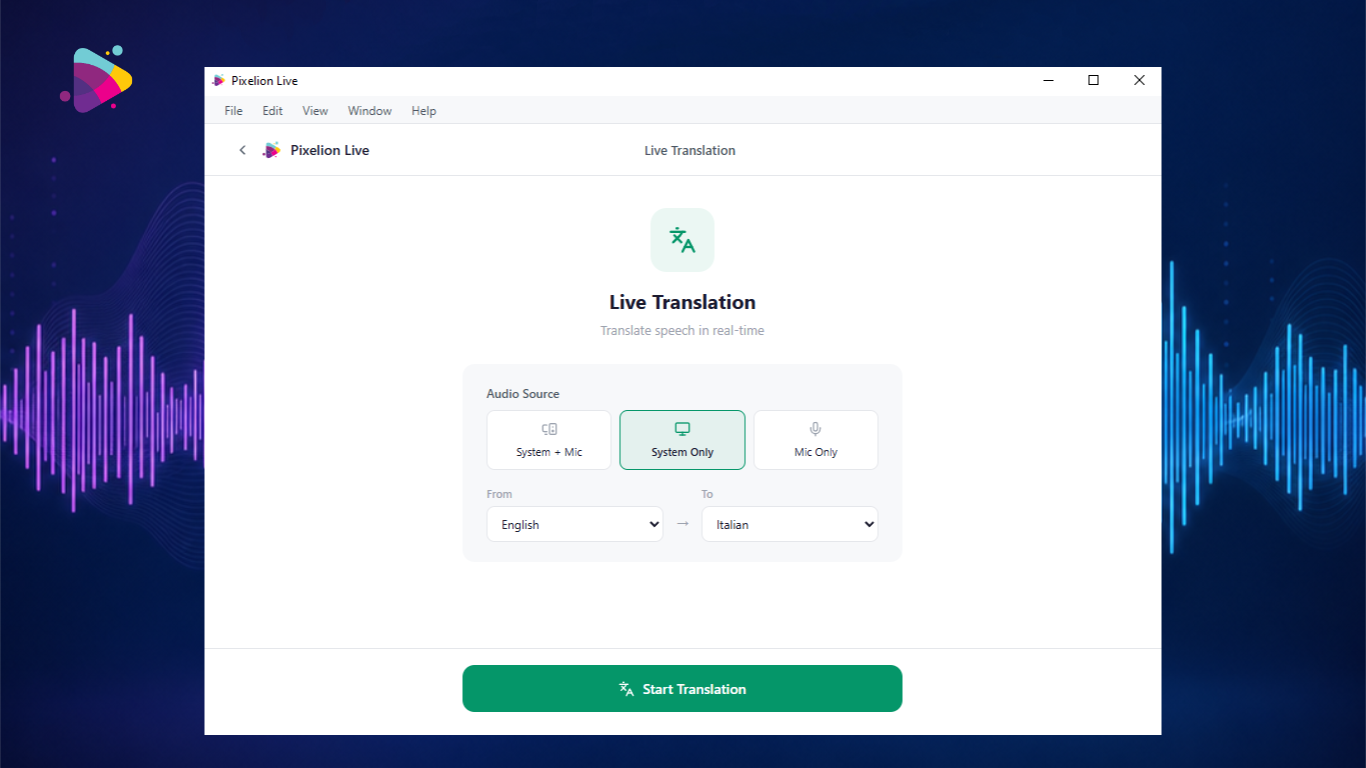
- From the home screen, select Live Translation
- Choose your audio source (System + Mic, System Only, or Mic Only)
- Set the source language (or leave on Auto-detect)
- Set the target language
- Click Start Translation
The dual-pane view appears immediately. The left side shows the source transcript; the right side shows the translation. Both update word by word.
Session Length and Reliability
Pixelion Live handles long sessions gracefully. The app automatically rotates connections in the background to maintain continuous translation for up to 2 hours on the Pro plan. If a connection drops, it reconnects automatically without losing any of the transcript.
- Free plan: 5-minute sessions (test the feature)
- Pro plan: Up to 120-minute sessions with seamless reconnection
What Happens After the Session
When you stop the recording, Pixelion Live saves everything locally:
- The full transcript in the source language
- The complete translation in the target language
- A WAV audio recording of the session
From the job detail screen, you can:
- Edit the transcript inline
- Export to PDF, DOCX, or PowerPoint
- Run speaker identification to label who said what
- Push to the Pixelion cloud dashboard for access from any device
- Generate AI meeting notes and summaries
Privacy and Security
Pixelion Live uses ephemeral tokens for each session. No API keys are stored on your device. Audio is processed by OpenAI's Realtime API and is not used for training. The local transcript and audio recording stay on your machine unless you explicitly push them to the cloud.
Getting Started
Pixelion Live is available on the Microsoft Store for Windows 10 and 11. The free plan lets you test live translation with 5-minute sessions. Upgrade to Pro for full 2-hour sessions, cloud sync, speaker identification, and AI meeting summaries.
Download Pixelion Live from the Microsoft Store
Or visit pixelion.ai for more about the full Pixelion content suite, including video-to-blog, social media posts, YouTube chapters, and SEO metadata.