Translate video subtitles to English or any language using AI. Upload a file for polished translated SRT files, or use Pixelion Live for real-time translation.
You have a video in one language and need subtitles in another. Maybe it is a YouTube video you want to understand, an interview you need to share with an international team, or your own content that you want to reach a global audience.
AI subtitle translation handles this in minutes. Upload a video, get subtitles generated and translated into your target language, and export them ready to use.
Two Approaches to Video Subtitle Translation
Post-Production Translation (Pixelion Web)
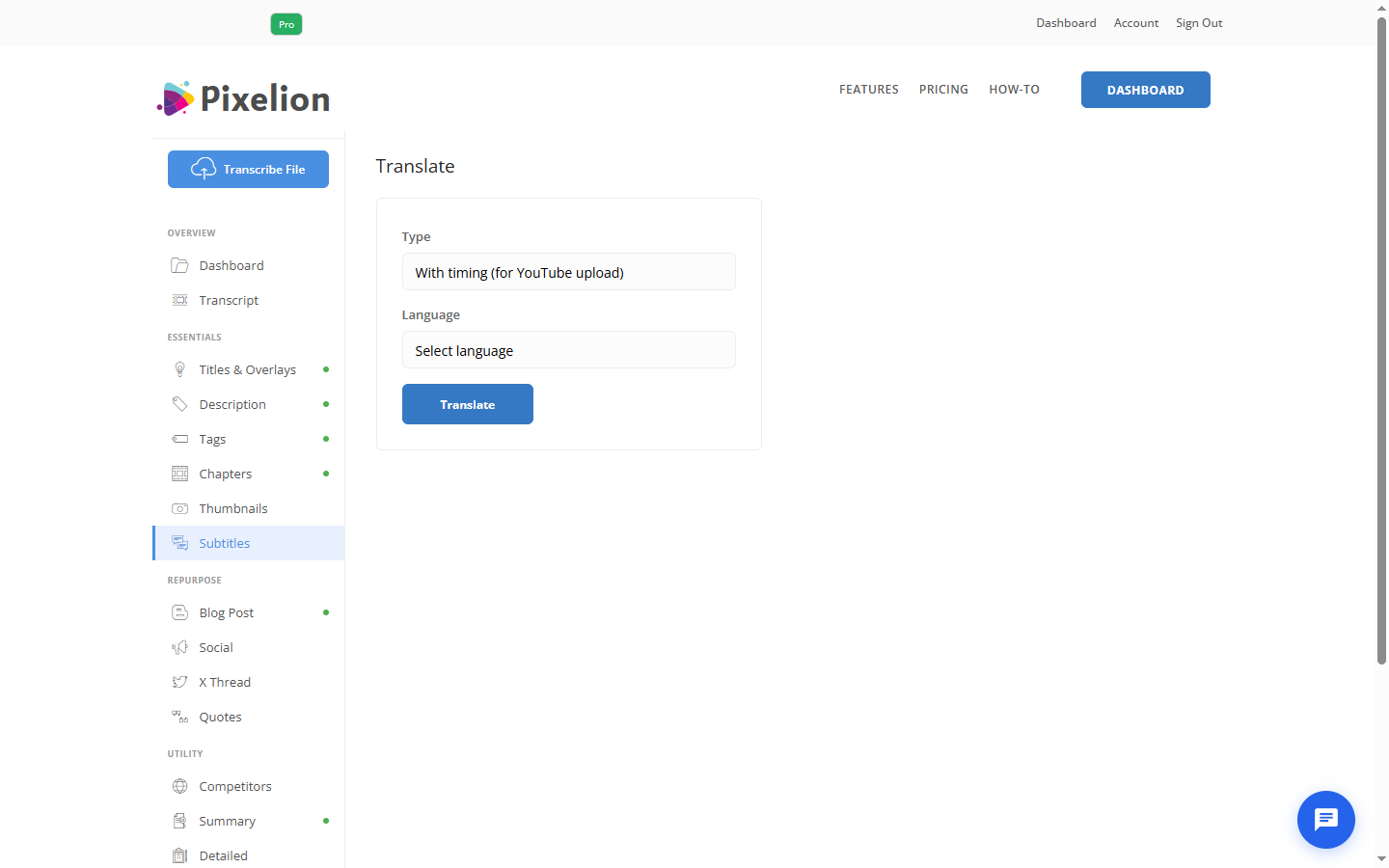
Upload a video file to Pixelion, get a transcript, then translate the entire subtitle file into 50+ languages. This works best for pre-recorded content where you need polished, editable subtitles.
- Upload any video or audio file
- AI generates timestamped transcript in the source language
- Translate to your target language with one click
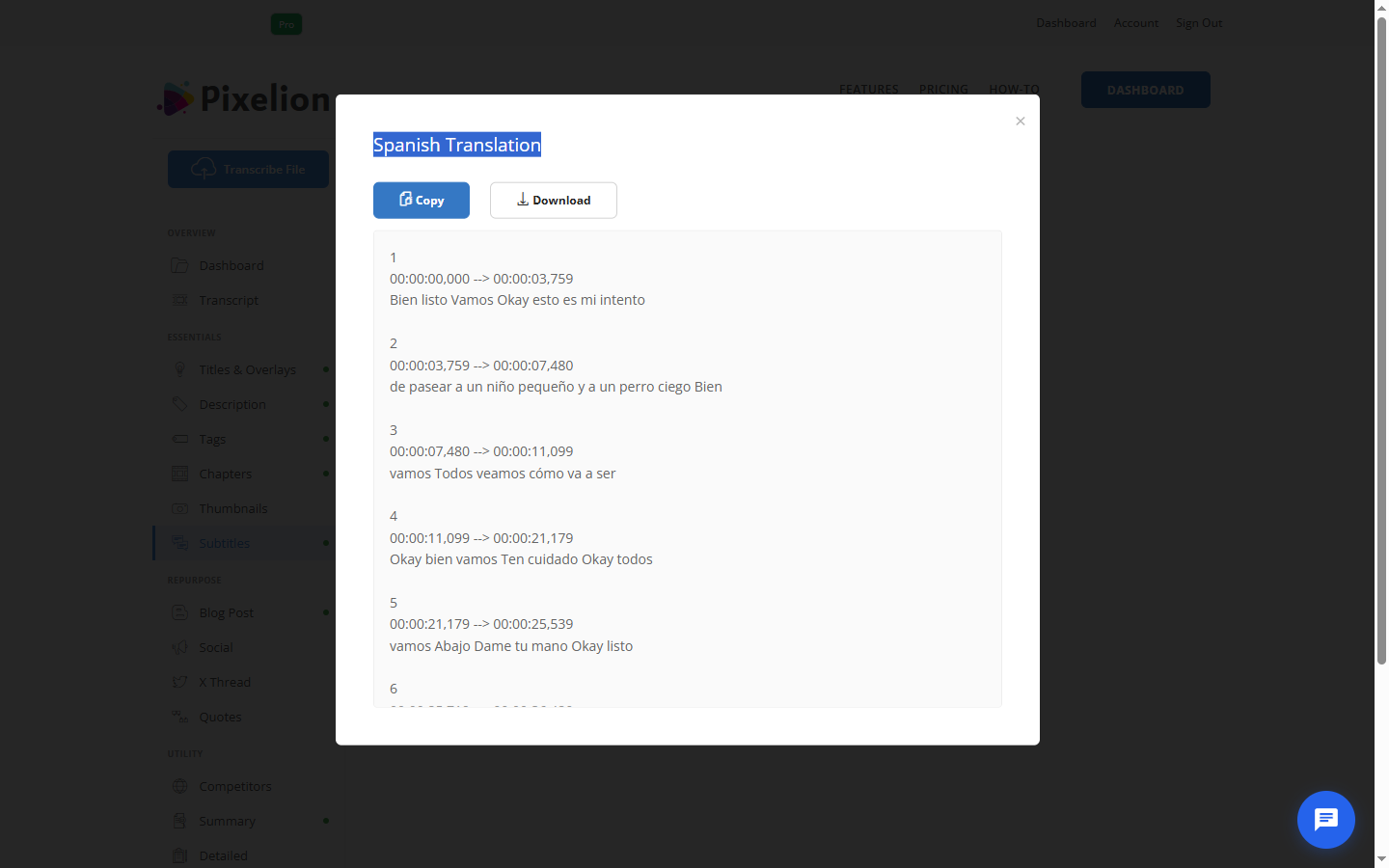
- Export translated subtitles as SRT or VTT
- Edit translations before exporting if needed
Real-Time Translation (Pixelion Live)
For live content (video calls, livestreams, conferences), Pixelion Live translates speech as it happens. The Windows app captures audio from any source on your PC and displays both the original transcript and the translation side by side.
- Captures system audio (YouTube, Zoom, Teams, any app)
- Real-time dual-pane display: source language + translation
- 12 supported languages
- Saves both transcripts after the session
How to Translate Video Subtitles with Pixelion
Method 1: Upload and Translate (any file)
- Go to pixelion.ai and upload your video
- Wait for the transcript to generate
- Click Translate and select your target language
- Review the translated text
- Export as SRT or VTT in the translated language
Method 2: Real-Time (live audio)
- Open Pixelion Live on Windows
- Select Live Translation mode
- Choose source and target language (e.g., Spanish to English)
- Play the video or join the call
- Watch the translation appear in real time
Supported Languages
Pixelion Web (subtitle translation): 50+ languages including English, Spanish, French, German, Italian, Portuguese, Japanese, Korean, Chinese, Arabic, Russian, Hindi, Dutch, Swedish, Polish, Turkish, Vietnamese, Thai, Indonesian, and more.
Pixelion Live (real-time translation): English, Spanish, French, German, Italian, Portuguese, Japanese, Korean, Chinese, Arabic, Russian, Hebrew.
Use Cases
YouTubers Reaching International Audiences
Upload your video to Pixelion, generate English subtitles, then translate to Spanish, Portuguese, and French. Upload each SRT file to YouTube as additional caption tracks. This makes your content accessible to non-English speakers without dubbing.
Understanding Foreign-Language Content
Playing a video in a language you do not speak? Use Pixelion Live to capture the system audio and translate in real time. Or upload the file to Pixelion web and get a full translated transcript you can read at your own pace.
Multilingual Teams
Share meeting recordings with team members who speak different languages. Upload the recording, translate the transcript, and share the translated version. Everyone reads the meeting content in their preferred language.
Content Localization
Translate your video subtitles into multiple languages to publish localized versions on social media. Each translated SRT file can be uploaded to the respective regional platform or embedded in the video.
Tips for Better Subtitle Translation
- Start with accurate source subtitles. Translation quality depends on the quality of the original transcript. Review and correct errors before translating.
- Keep sentences short. Short, clear sentences translate better than long complex ones with idioms.
- Review proper nouns. Names, brands, and technical terms may not translate correctly. Check them manually.
- Consider cultural context. Jokes, references, and idioms may need localization rather than literal translation.
- Test timing. Some languages produce longer text than others. German and French translations often run longer than English, which can affect subtitle display timing.
Get Started
Pixelion offers subtitle translation in two ways: upload a file for polished translated subtitles, or use Pixelion Live for real-time translation of any audio playing on your Windows PC.