YouTube silently hides chapters if you break its rules. The exact requirements, how to find real topic boundaries, and what makes a label worth clicking.
The Short Version
Transcribe the video with timestamps, find where the topic actually changes, and write a label for each section. Paste the list into your description starting at 0:00. YouTube needs at least three timestamps, the first must be 0:00, each section must run at least 10 seconds, and they must be in ascending order. Miss any of those and chapters silently do not appear.
YouTube's Actual Requirements
Worth stating precisely, because this is where most attempts fail and YouTube gives you no error message. Chapters either appear or they do not.
- The first timestamp must be
0:00 - There must be at least three timestamps
- Each chapter must be at least 10 seconds long
- They must be listed in ascending time order
- They go in the video description, one per line, timestamp first
Format looks like this:
`` 0:00 Intro 1:42 Why the first attempt failed 6:15 Setting up the pipeline 11:30 Results after three weeks 14:05 What I would do differently ``
If chapters do not show up, check the 0:00 line first. It is the most common omission.
Why Chapters Matter
Two reasons, one obvious and one less so.
The obvious one is navigation. Viewers skip to what they want instead of scrubbing blindly, which tends to keep them on the video rather than sending them back to search results.
The less obvious one is that chapters can surface as jump links directly in Google search results. A single video can then occupy more space in the result and match several different queries, one per chapter, rather than competing on one title alone.
Step 1: Get a Timestamped Transcript
Chapters are built from timestamps, so a transcript without them is not usable here. You need to know when each thing was said, not just that it was said.
Timestamp accuracy matters more than you would expect. Small drift is invisible in a transcript you are reading but produces chapters that land a few seconds into the wrong section, which is worse than no chapters because it feels broken.
Do not work from YouTube's automatic captions if you can avoid it. They have no punctuation and no sentence boundaries, which makes finding topic changes considerably harder.
Step 2: Find the Real Topic Boundaries
This is the part that separates useful chapters from decorative ones.
A chapter boundary is where the subject genuinely changes, not where a fixed amount of time has passed. Tools that split a video into equal blocks are not generating chapters, they are generating a ruler.
Real boundaries are uneven, and that is correct. A 20 minute video might have one section running eight minutes and four others covering the rest. If every chapter in your list is suspiciously similar in length, the split was done by duration rather than content.
Practical signals that a topic changed:
- You explicitly said so: "so that is the setup, now the results"
- The vocabulary shifts, with a new set of nouns entering
- A question gets asked, in an interview
- You moved from explaining to demonstrating
Step 3: Write Labels Someone Would Click
The timestamp is mechanical. The label is editorial, and it is where the value is.
The test is whether the label would earn a click on its own. Compare:
| Weak | Strong |
|---|---|
| Intro | What this actually costs |
| Main discussion | Why we stopped using Postgres |
| Part 2 | The mistake that cost three weeks |
| Conclusion | What I would do differently |
"Intro" is the one exception worth keeping, because viewers understand it as a skip target.
Keep labels short. They render in a narrow space and get truncated. Front-load the specific words.
Step 4: Check the Count and the Gaps
Before publishing, verify:
- The list starts at
0:00 - There are three or more entries
- No section is shorter than 10 seconds
- Times ascend with no duplicates
- The final chapter is not two seconds before the end of the video
Three to ten chapters suits most videos. More than about twelve on a short video starts to fragment it, and viewers stop reading the list.
Step 5: Reuse Them
The chapter list is one of the most reusable artifacts you will produce. It is effectively an outline of your own video, so it also works as:
- The section headings for the blog post version
- The topic breakdown in podcast show notes
- The skeleton of a detailed summary
- A social post, when the list itself is interesting enough to read
If you are writing the blog post version of the video anyway, generate chapters first and use them as the outline.
Doing It in One Pass
Pixelion generates chapters with timestamps from the transcript of a single upload, finding topic boundaries rather than splitting by duration. The same transcript also produces the blog post, social posts, titles and descriptions and tags, show notes, summaries, and thumbnails.
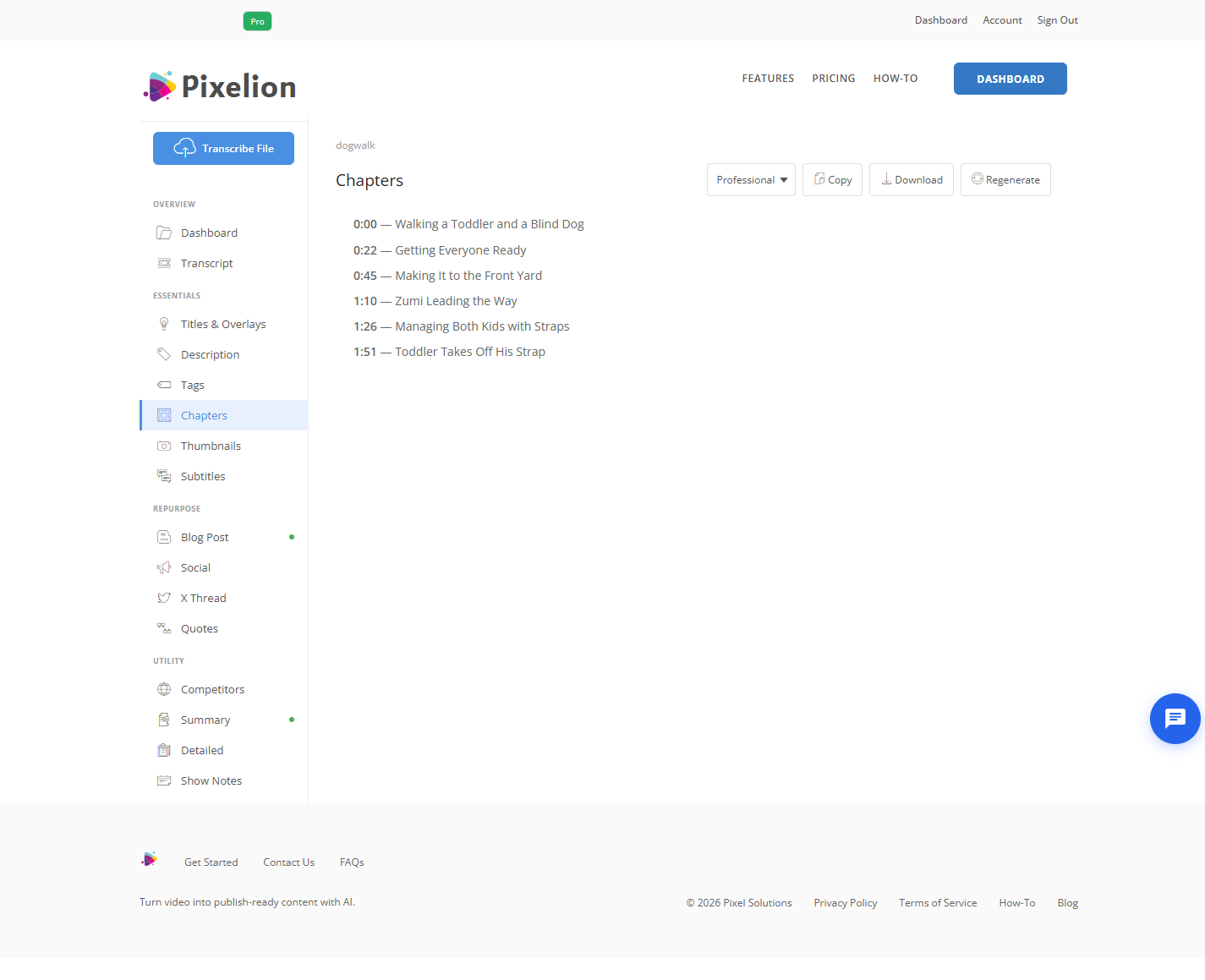
Worth being straight about the market here: there are many free single-purpose chapter generators, and if chapters are genuinely the only thing you need, one of those will do the job. Pixelion makes sense when chapters are one of several outputs you want from the same recording.
What Good Output Looks Like
For a 20 minute video: five to eight chapters of uneven length, starting at 0:00, each labelled with something specific enough to click. Total time to produce after generation is about two minutes, nearly all of it spent improving labels.
Common Mistakes
Forgetting the 0:00 line. The single most common reason chapters do not appear. YouTube will not tell you.
Generic labels. "Part 1", "Section 2", and "Discussion" give viewers no reason to jump anywhere.
Evenly spaced chapters. A sign the split ignored the content. Real topics are uneven.
Too many chapters. Fifteen chapters on a ten minute video fragments it and nobody reads the list.
Chapters under 10 seconds. Breaks YouTube's rules and silently disables the whole set.
Trusting timestamps without checking. Spot check two against the video. If the transcript drifted, every chapter is slightly wrong.
Frequently Asked Questions
Why are my YouTube chapters not showing up? In order of likelihood: the list does not start at 0:00, you have fewer than three timestamps, or one section is shorter than 10 seconds. All three fail silently.
How many chapters should a video have? Three is the minimum YouTube accepts. Three to ten suits most videos. Let the content decide rather than a target number.
Do chapters help SEO? They can surface as jump links in Google results, letting one video match several queries. They also affect watch time, which matters more.
Can I generate chapters from a YouTube URL? Depends on the tool. Uploading the original file generally gives better timestamp accuracy than working from a compressed stream.
Do chapters work on Shorts? No. Chapters apply to standard videos, not Shorts.
Should chapter titles match my blog post headings? It is a reasonable default, since both are derived from the same topic boundaries. Chapter labels need to be shorter, because they render in a narrower space.